
Preview Before Disc Burn

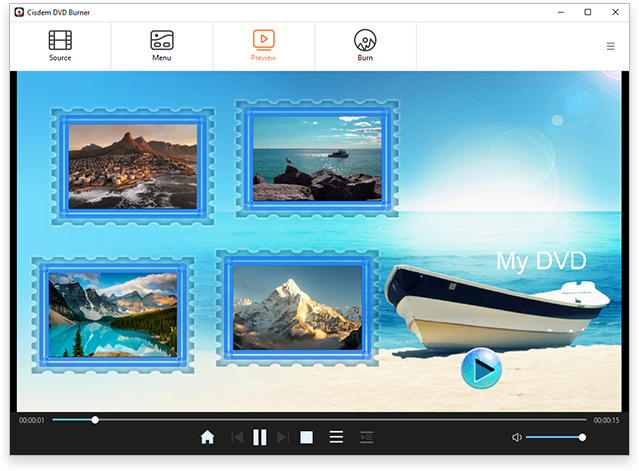
Preview before you burn to prevent mistakes and disc waste.

True-to-DVD Simulation

See how the DVD will look on a player to make sure menus, text, and backgrounds match exactly.

Interaction Testing

Test all buttons like playback, previous, next, menu, title, and chapter to ensure effective and accurate navigation.

Real-Time Edit

As you edit your projects, the preview updates instantly with the latest changes - convenient to see adjustments.

Burn Videos to 3 Format Options

Ready to showcase your work? Cisdem DVD Burner makes it easy - Burn to discs for keepsake or save as digital files to share and archive.

Burn to DVD Disc

Let you burn videos to DVD-R, DVD+R, DVD-R DL, DVD+R DL, DVD-RW, DVD+RW, DVD-RAM, BD-R, BD-RE, and more.

Note:
  • For one-time burning

    Use -R or +R disc
  • For multiple rewrites

    Use RW or RAM disc. RW is more common and more compatible.
  • For double capacity

    Use -R DL or +R DL disc
  • For highest capacity

    Use Blu-ray BD-R (write once) or BD-RE (write multiple times) disc. You can burn videos to a Blu-ray disc with Cisdem DVD Burner, but it's still DVD quality, not HD. And it can only be played on a Blu-ray DVD player.

Burn to DVD Folder

Create a VIDEO_TS folder with titles, chapters, and menus. You can enjoy full disc playback directly on your computer without burning it.

Burn to ISO Image

Package your project into a single ISO file. Perfect for backup, sharing, and as a master to burn identical copies anytime.

Burn Videos to Project File

Not ready to burn? Save your editing progress as project file so you can reopen it later and make changes using Cisdem DVD Burner. It keeps everything intact until you’re ready to burn.

  • Resume Editing Anytime – Can continue editing from where you left off.
  • Make Changes Flexibly – Easily add more videos, change menu template, etc.
  • Keep Your Work Safe – Save anytime to avoid losing edits if the app closes unexpectedly.
Burn Videos to Project File

Burn DVD in 4 Playback Modes

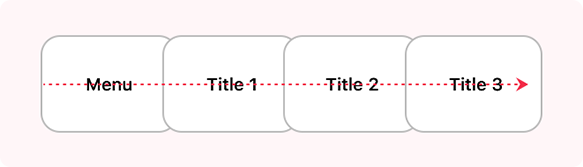
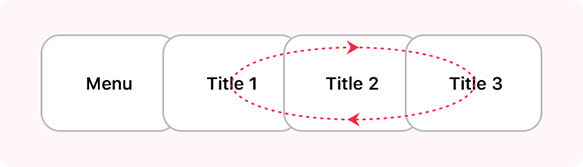
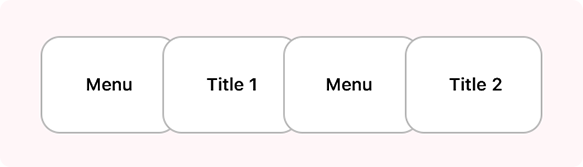
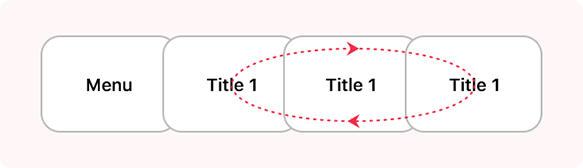
To meet different playback needs, Cisdem DVD Burner provides 4 playback modes, ensuring your disc delivers the best possible viewing experience in any occasion. All DVD playback follows the same rule: If a menu exists, it plays first. Otherwise, playback starts directly from the title.

Sequential Play

Start from menu and play all titles sequentially.

Loop All

Loop All

Start from menu and loop all titles.

Loop All

Manual Play

Loop the menu, play the title when pick it and return to menu.

Loop All

Single Loop

Loop the menu and loop a title when pick it.

Loop All

Burn Multiple DVD Copies without Re-encoding

Duplicate your DVD project, no repeat setup and burn required.

Burn Once, Copy Many

After burning a disc, Cisdem DVD Burner won't re-encode videos and render menus, just quickly copy the same content onto the next disc.

Perfect Copies, Every Time

Whether it's the video quality, menu, or chapter, every disc you create is a perfect replica of the first.

Extremely Simple to Use

Simply set the desired copies number (up to 30), insert a blank disc, and click Burn. Finish one disc, then insert the next to continue.

Step 1