


12 Best (Free) Mac Data Recovery Software for 2026
 70.2K
70.2K
 10
10


Looking for a piece of Mac data recovery software that helps you recover deleted or lost data from different storage device? We’ve picked out for you, basing on strict criteria and rigorous testings. Though the list is long, with 12 best choices, by checking the pros and cons of each, also the comparison table, you will be able to find the most suitable data recovery software for your Mac.
 Cisdem Data Recovery for Mac
The Best Overall for 2026: Safe, Reliable and Fast
- Restore files from internal and external hard drive, SD card, USB, etc.
- Support recovery of images, videos, audios, documents, 200+ types
- Repair damaged videos, photos and documents in different formats
- Preview recoverable files and recover wanted files only
- Filter files to quickly search a specific file
- Restore files to local drive or Cloud
- Support latest Mac chip (M5, M4) and macOS Tahoe.
 Free Download macOS 10.15 or later
How We Pick The Best Data Recovery Software for Mac?
As a piece of best data recovery software for Mac, it should have capabilities as below:
- Security. First of all, good data recovery software shouldn’t have adware or malware attached to it. And it won’t cause further data deletion or loss without notice.
- Easy of Use. It should be very user-friendly and handy even for novices.
- Scan & Recovery Speed. A high scanning speed simply means that you’ll recover your lost data faster.
- Recovery Rate. It should bring back lost data as much as possible, no matter where and how it gets lost. And the retrieved data should be usable, instead of corrupted or empty.
- File Types Support. It should support the recovery of file types such as Photos, Videos, Documents, Audio, Emails, Archives and many more.
- Storage Device Support. As data loss can always happen to external devices, so best data recovery software must be able to recover data from internal as well as external drives like pen drive, SSD, USB drive, SD card, etc.
- File Systems Support. No doubt that Mac data recovery should be compatible with file systems such as HFS and HFS+. And a better one can also support other file systems like NTFS, FAT32, exFAT, ext4 and more.
- Preview before Recovery. Good data recovery software should offer you the option to preview your files before initiating the recovery process. Thus you can directly know what can be recovered and which one you need to recover.
- Help & Support. The best data recovery software should come with exceptional support like FAQs, manuals, and tutorials to make the recovery process as smooth as possible.
Best (Paid) Mac Data Recovery Software for 2026
Actually, over the past 5 years, we’ve tested dozens of Mac data recovery programs, most of which are similar in function and performance. Here we just pick 8 classic and best apps for your information.
#1 Cisdem Data Recovery
Taking performance, specification and value for money into considerations, we conclude that Cisdem Data Recovery is on the top of the best list.
This software scans the lost data on your drive, identifies the types of files and helps you recover them, in an extremely easy way. You don’t have to be tech savvy or know much about data loss.
It is 100% clean without any virus or malware, provided that you download it from the official website. You can click below download button to download it safely or click the safe link to try it for free:https://download.cisdem.com/cisdem-datarecovery.dmg. And it only performs read-only procedures on your device, so it is secure as well and won’t do any damage to the device.
Main Features of Cisdem Data Recovery:
- Recover deleted, missing, unsaved, trash emptied, formatted and corrupted files
- Support restoring 200+ types of files: video, image, audio, document, archive, etc.
- Support nearly all types of storage devices: external hard drive, USB, SD card, iCloud, etc.
- Repair damaged videos, photos, documents
- Rescue data from unbootable Mac with ease
- Create disk backup and recover data from the disk image
- Create bootable macOS installer
- Fast scanning: pause and resume at anytime
- Quickly search files with filters
- Preview before recovery.
- High recovery rate
- Support latest M5, macOS Tahoe
Cisdem Data Recovery for Mac Review
What we like about Cisdem Data Recovery is the interface. It is adequate for all levels of computer users and the recovery process is quite straightforward. You can make necessary changes on the specific data you prefer to recover in advanced settings. This can be very handy if you only need a few GBs of data rather than 100GB+!
We also exceptionally like its performance, it scans faster and recovers more than its competitors. Even when comparing with Disk Drill, it takes 10% less time in the scanning process, while recovers 30% more files as the result. It is definitely a good Mac data recovery tool worth considering if you’re dealing with recovering precious data.
Price: $59.95~$149.95
Platform: macOS Tahoe and earlier
Pros:
- Intuitive interface for easy use
- Fast scanning speed
- High recovery rate
- Affordable price
- Smooth and user-friendly user experience
- File preview with small or large thumbnails
- Additional features: video repair, iCloud recovery, disk backup, bootable macOS installer, etc.
Cons:
- Some files couldn’t be previewed
How to use Cisdem Data Recovery on Mac?
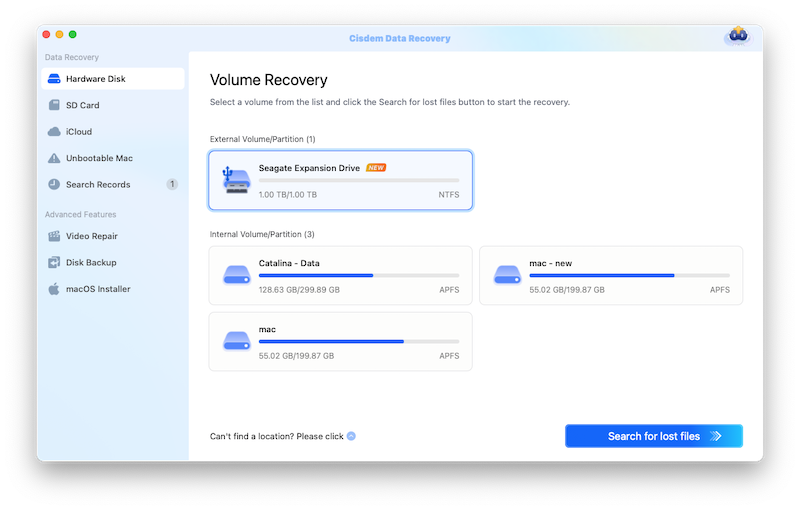
- Download and install Cisdem Data Recovery on your Mac.
Free Download macOS 10.15 or later - Choose the location where you want to recover files from.
![best data recovery software cisdem 01]()
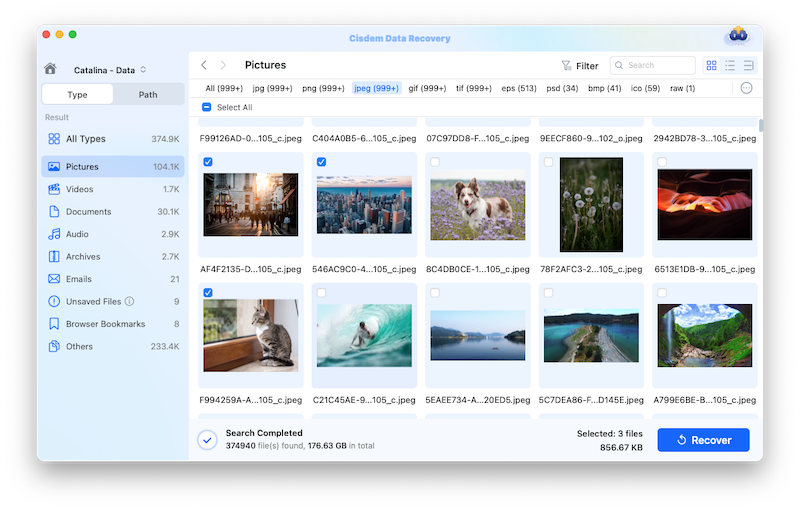
- Click Search for lost files to start scanning lost files, then go to Type/Path and find the files in a specific folder.
![best data recovery software cisdem 02]()
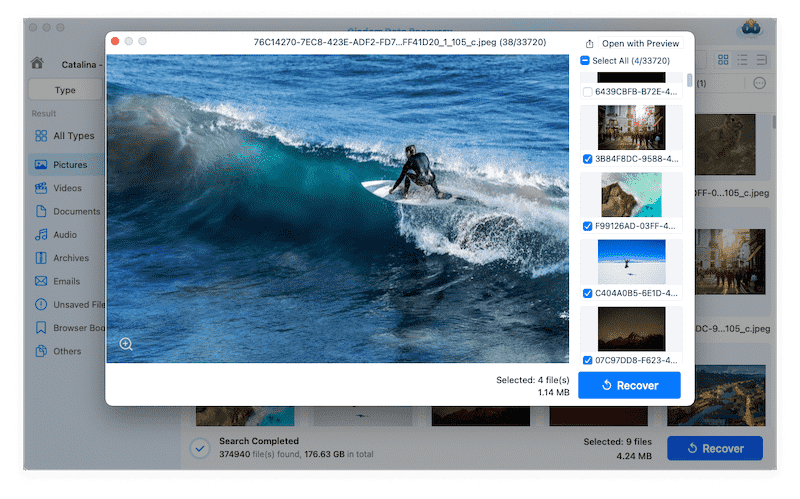
- Preview the found files and select them, then click Recover to get them back.
![best data recovery software cisdem 03]()
#2 Disk Drill
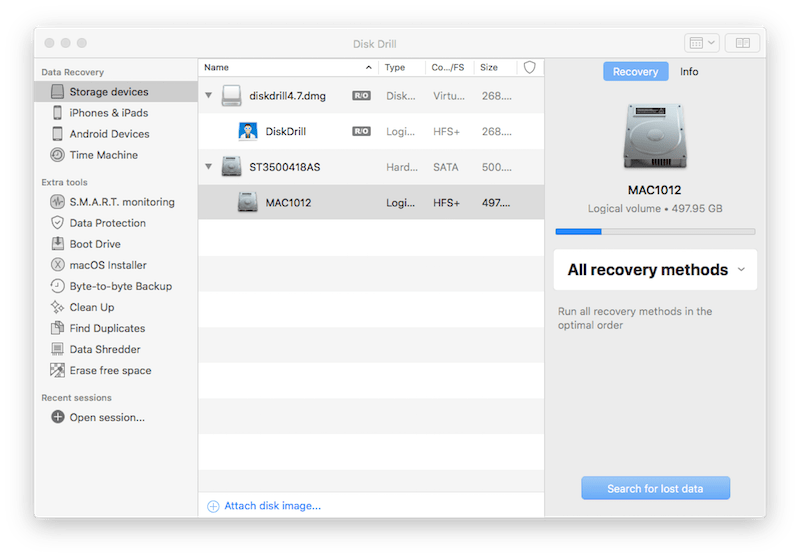
Disk Drill is a feature-rich disk utility tool to monitor, protect, backup, clean up, remove, erase and recover data on Mac. There are 5 data recovery methods in Disk Drill: Storage Devices, Advanced Camera Recovery, iPhones & iPads, Android Devices, Time Machine. Users can recover data from Mac internal and external disks, also recover files from mobile devices.
It also offer additional tools to enhance Mac performance, such as S.M.A.R.T.Monitoring, Data Protection, Boot Drive, macOS Installer, Byte-to-byte Backup, Clean Up, Find Duplicates, Data Shredder, Erase Free Space.
Is Disk Drill really free to use on Mac? No. Though Disk Drill claims itself as a free data recovery program for Mac, it is not, the free trial only recovers up to 100 MB, which is meaningless in most cases.
Disk Drill has a great presence over the Internet, thanks to its PBN websites and paid advertisement, that’s why it is mentioned or recommended everywhere online. With an average rating of 2.1/5.0 on Trustpilot, you may feel confused about why Disk Drill ranks top on the list. It helps recover data indeed, but as we should know data loss is not always simple and the difficulty varies according to each personal use case, which means it helps someone, while fails someone. But according to my testing, it does better in recovering documents than recovering other types of files.
Price: $89 for single user, $499 for enterprise
Platforms: macOS 10.5+
Pros:
- Restore data also from iOS and Android devices
- Rich and powerful utility tools: monitor, protect, backup, clean up, erase data, find duplicates, etc.
- Preview recoverable items
- Recent scan records available
Cons:
- Cannot choose specific file types for fast scanning
- Large size installer
- Not good at recovering media files
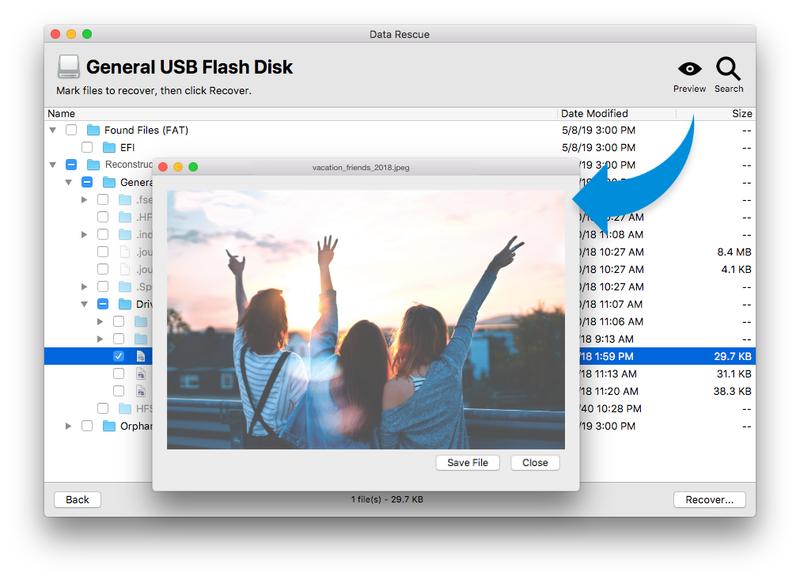
#3 Data Rescue 6
Data Rescue offers 4 options to deal with data loss: scan drive and recover files, view previous scan results and recover from general USB disk, duplicate failing drive to a healthy drive, and create recovery drive to safely recover files. These options make a high recovery rate and give users more freedom to recover files lost under different situations. It additionally supports RAID recovery and allows erasing files.
Price: $79 for monthly license, $399 for annual license
Platforms: macOS10.12+
Pros:
- High recovery rate
- Support different data loss situations
- Improved RAID recovery
- Support virtually all devices and file formats
Cons:
- Deep scan takes a long time
- Need internet connection all the process
- Extra storage device required for recovery
#4 R-Studio 7
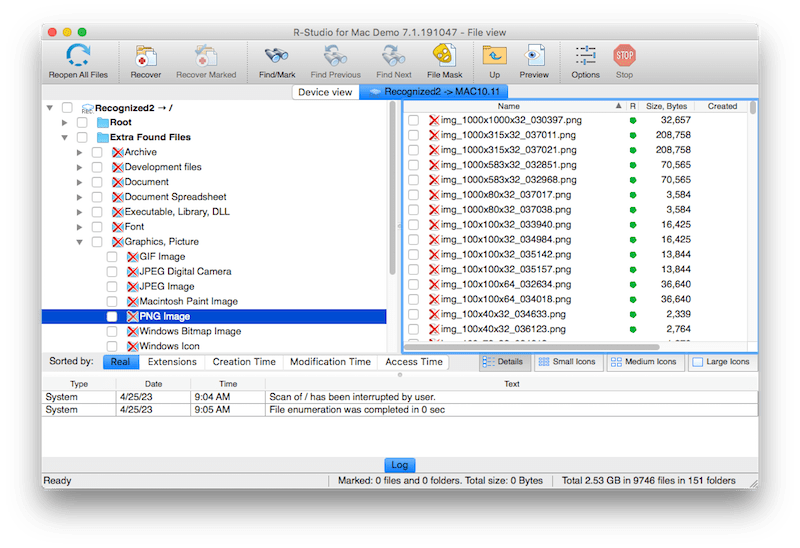
Gearing toward data recovery professionals, R-Studio for Mac boasts an assortment of advanced features like virtual RAID, network recovery and disk imaging, but accordingly is not that easy-to-use for regular home users. Analysts will love it for its powerful ability on data analysis and statistical modeling.
Price: $79.99 for one user, $179.99 for corporate
Platforms: macOS 10.5+
Pros:
- Damaged RAID recovery
- Recovery over Network
- Additional features: disk imaging, Pro Hex editor, file sorting, file viewing and S.M.A.R.T Monitoring
Cons:
- Different installation packages for new & old macOS
- Complicated interface, not friendly to beginners
- Distorted classification of scan results
#5 Stellar Data Recovery Professional
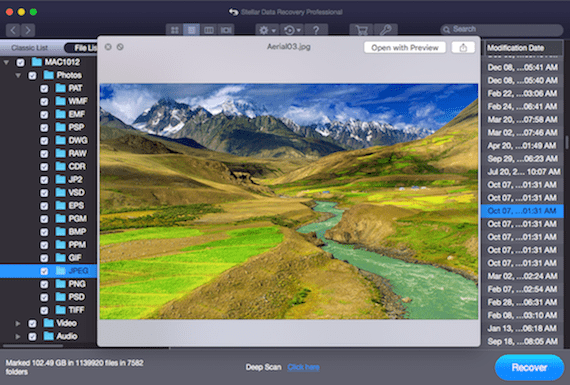
You’re allowed to get a customizable Mac file recovery with Stellar Data Recovery Professional software. It’s capable of scanning certain types of file as you wish, like documents, emails, videos, audios and photos. Also, you can choose to scan everything from your device. Stellar belongs to a popular name in data recovery, overall ensuring a relatively stable performance.
Price: $89.99 per year
Platforms: macOS 10.12+
Pros:
- Customized scan plan
- Real-time scan progress showed
- Restore data from crashed or non-booting Mac
- Speed up Mac
Cons:
- Unstable scanning speed
- Unresponsive buttons
- Long time to show file preview
- Documents cannot be recovered sometimes
#6 Recoverit
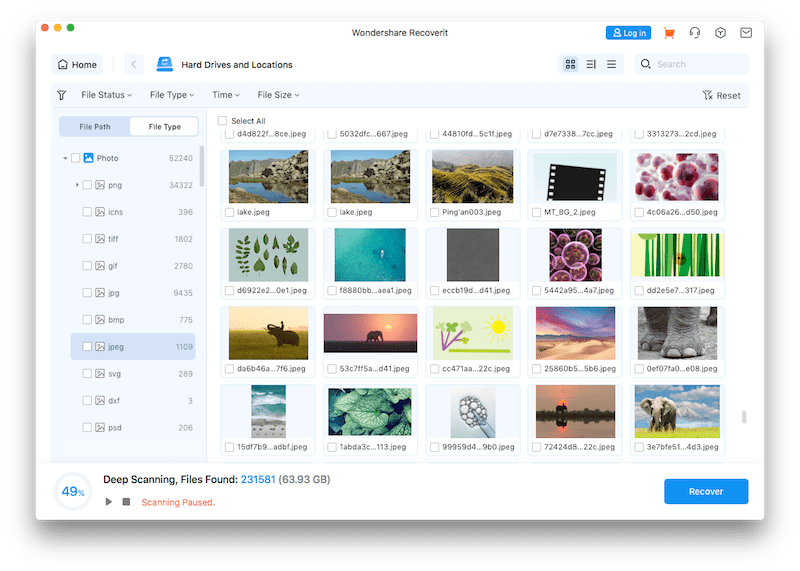
Wondershare Recoverit Data Recovery provides an enhanced recovery feature to restore your lost videos or photos from all devices, such as Canon, Sony, DJI, GoPro, Seagate and SD card. It offers file repair tools to fix corrupted videos and photos. Also users AI to enhance blurry photos, or refine facial details on a photo. Recoverit’s clear interface and wide range of features give beginners the effective and simple recovery experience.
Price: $84.99 per month, $94.99 per year, $144.99 lifetime
Platforms: macOS 10.15+
Pros:
- Support data recovery from system crashed computer
- Recover NAS data
- Repair damaged video and photo
- Offer AI photo enhancer
- Monitor the health of Mac disk
Cons:
- Remaining recovery time unknown
- The scanning is slow
- Lower recovery rate when comparing with others
- Find back a lot of useless files
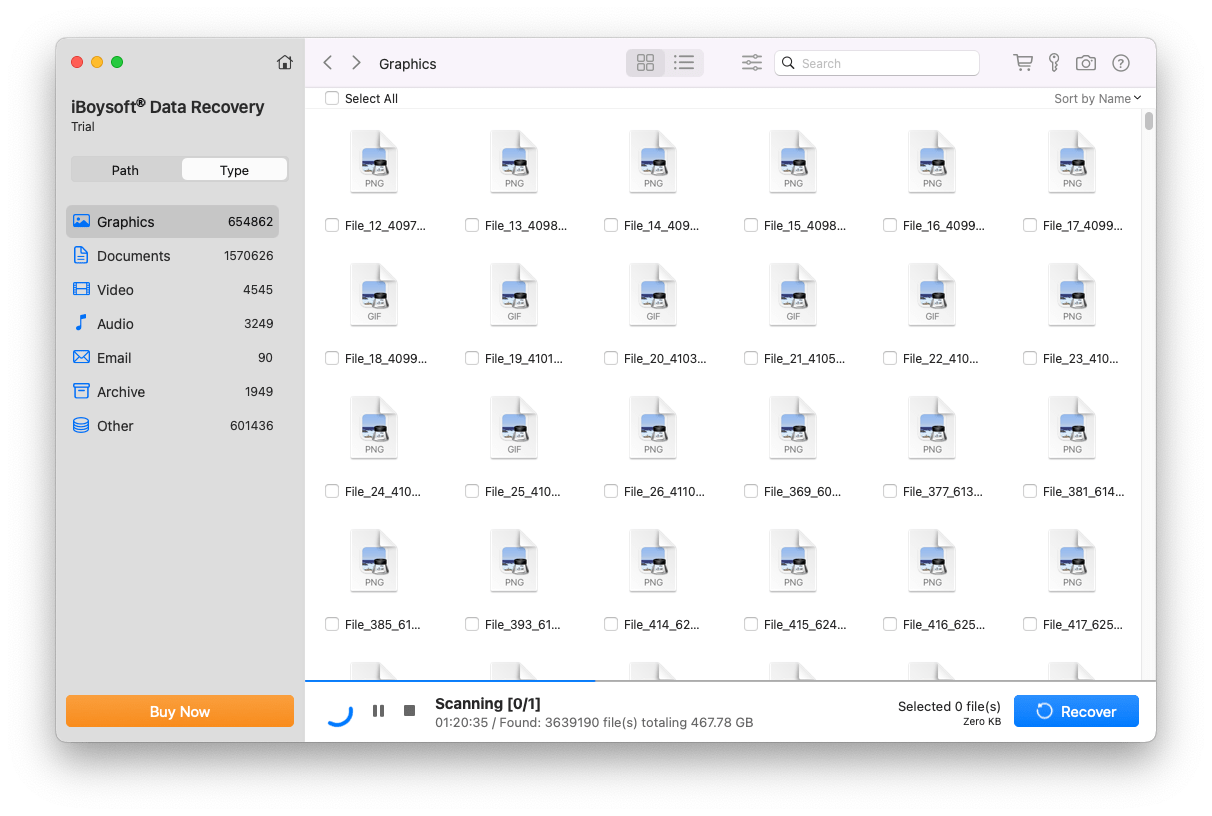
#7 iBoysoft Data Recovery
iBoysoft Data Recovery for Mac has been designed for recovering files from external encrypted disks as well as unreadable drives and memory cards. One of its highlight is the capability to restore data from split fusion drive. While, one obvious shortage is that iBoysoft has no option to preview files, which will lead to inconvenience when you’d like to locate the desired files in a efficient manner.
Price: $89.95 per month, $99.95 per year, $169.92 lifetime
Platforms: macOS 10.11+
Pros:
- Recover 1GB data for free
- Scan records can be reloaded
- Recover data from fusion drive
Cons:
- Cannot preview files before recovery
- No file format filters for quick navigation
- Slow response when start, stop the scanning
- Lower recovery rate than others
#8 UFS Explorer Standard Recovery
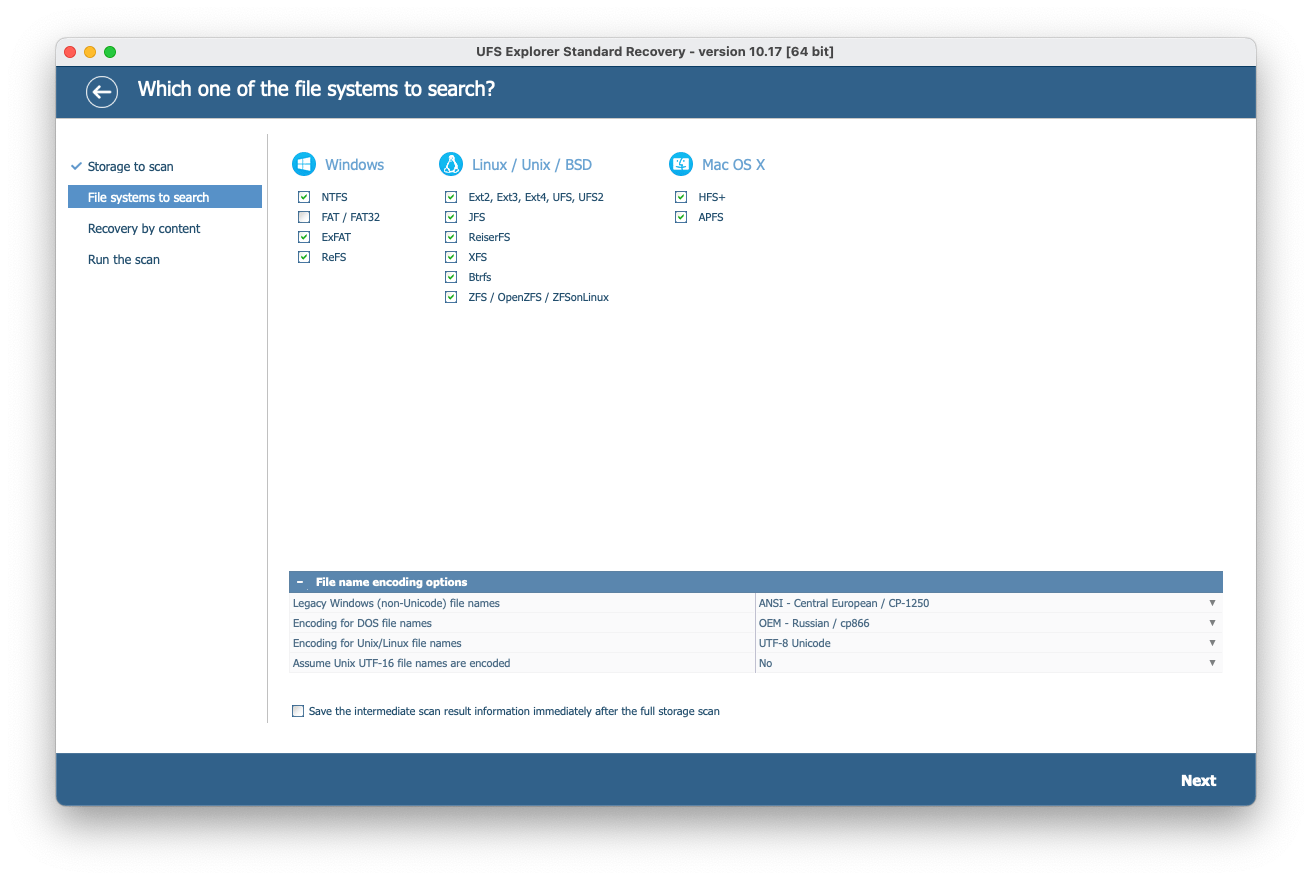
By utilizing UFS Explorer Standard Recovery software, you have to go through 4 steps before finally getting back the lost data on Mac. They’re Storage to scan, File systems to search, Recovery by content and Run the scan. It’s suggested to do the free trial of Mac data recovery before deciding to purchase any of its licenses, to make sure that this software exactly matches your requirements.
Price: $64.95 for personal, $134.95 for commercial, $199.95 for corporate
Platforms: macOS 10.9+
Pros:
- Raw data recovery
- Decrypt some encrypted volumes
- Work on disk images and virtual disks
Cons:
- Separate build for macOS 10.9 through 10.15
- Recovery interface is not user friendly
- Slow scanning
- Take long time to save a recoverable file
Best Free Data Recovery Software for Mac 2026
Data loss doesn’t happen every day, so you may be looking for a piece of free Mac data recovery software to retrieve your files this time.
Is there 100% free Mac data recovery software?
You are much likely to be misinformed online, as there are so many data recovery program developers claim that their tools are free to use. But it is not the truth. 99% of the Mac free data recovery software is not completely free, they just offer a free trial allowing users to recover up to 100MB, 200MB, 500MB, or at most 1GB data. And very often, we have a large capacity of data to recover, and finally we need to pay, upgrading to remove the limits.
Data recovery is a challenging task, even the best data recovery software cannot guarantee a 100% recovery rate, let alone free data recovery tools. But some open source data recovery tools are truly for free and allow to access to their full features. As follows the best 4 pieces of free Mac data recovery software will be unmasked.
#9 Terminal
Before probing into the third-party software solutions, some of you may wonder if there’s a way to recover Mac data without extra tools. Gladly the answer is YES! An useful built-in data recovery app on all macOS systems is called Terminal, whose operations are based on the command line. In case you just recently deleted a Mac file by accident, it’s still highly possible to restore it by executing specific command lines in Terminal.
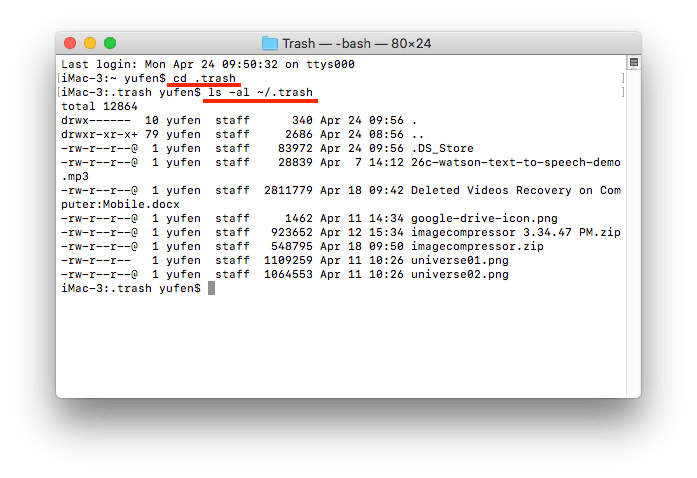
- Open Terminal on your Mac > input the command: cd .trash > hit Enter.
- Continue to type ls -al ~/.trash > press Enter. You can view all the contents in your Trash.
![mac terminal 01]()
- Type another command: mv filename .. > hit Enter again. Use the full name of the file that you need to recover in the command line.
![mac terminal 02]()
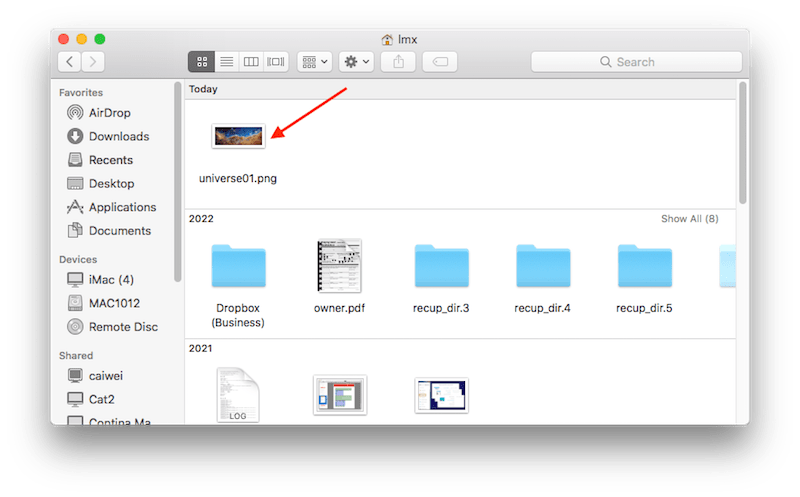
- Quit Terminal > go to find the recovered file in Finder.
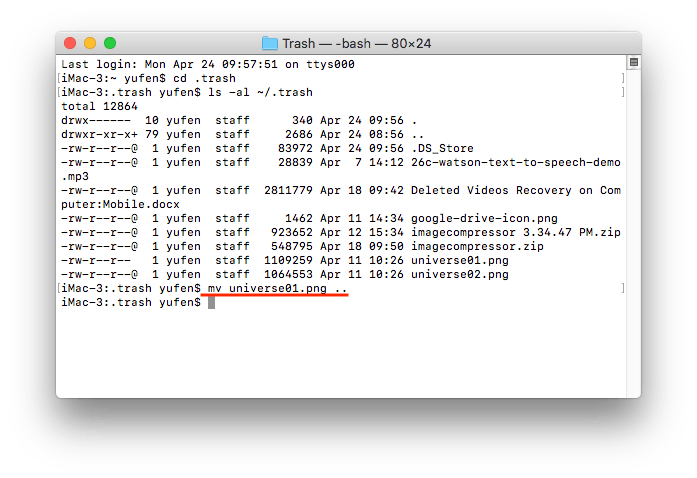
If Terminal proves to be of no avail, your lost Mac files are likely to be permanently removed.
#10 PhotoRec
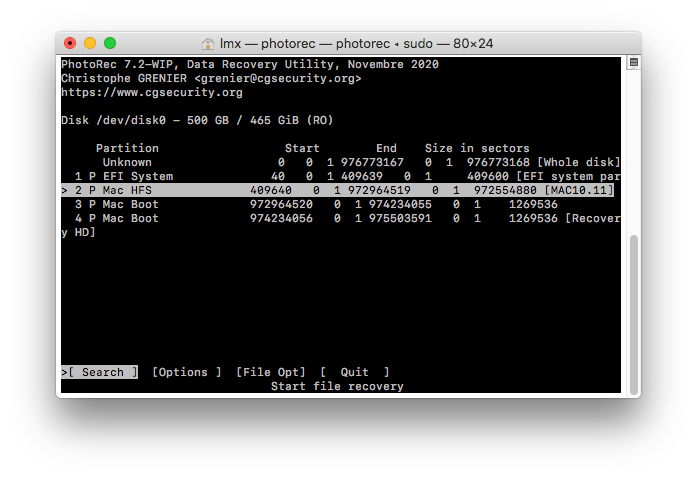
PhotoRec may be misunderstood as a data recovery program to recover photos only, while it is not. It is developed by cgsecurity, which is a personal website, helps users to recover lost photos, videos, archives, documents and 400+ types of file on Mac. Users can utilize all its full features and recover all found items. However, it is not user friendly because it uses command lines to run the program for recovery process.
Platforms: macOS 10.6+
Pros:
- Free to use
- Recover file from both Mac internal and external storage disks
- Restore 400+ types of files
Cons:
- Not user friendly, complicated for beginners
- Lower recovery rate than other paid data recovery programs.
#11 TestDisk
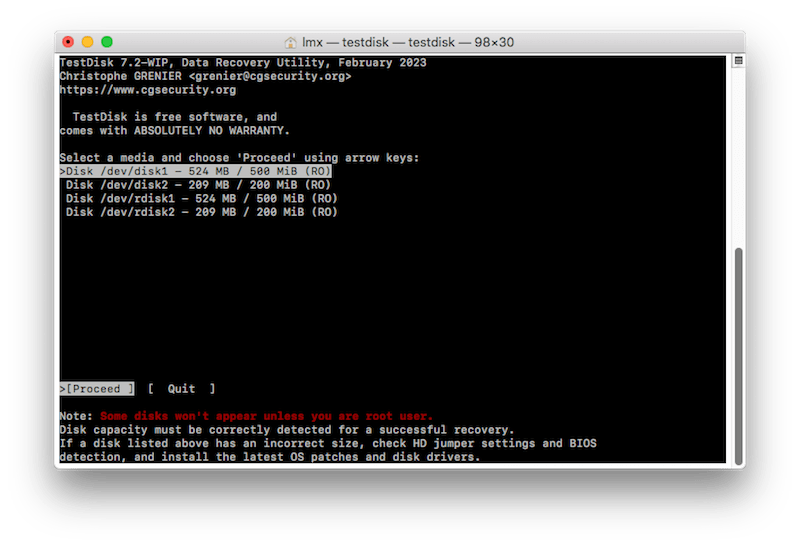
TestDisk comes in the same installation package with PhotoRec, but these 2 companions don’t perform equally in every aspects. PhotoRec focus on lost file recovery on your drives or other storage sources, while TestDisk is good at bringing back corrupted partitions and further repairing disks. TestDisk is also a data recovery utility based on command lines. Being reliable and secure, public can feel assured to use it.
Platforms: macOS 10.6+
Pros:
- Free to use
- Compatible with Windows, macOS and Linux
- Fast recovery speed
Cons:
- Difficult for novices to operate
- No technical support
#12 DMDE
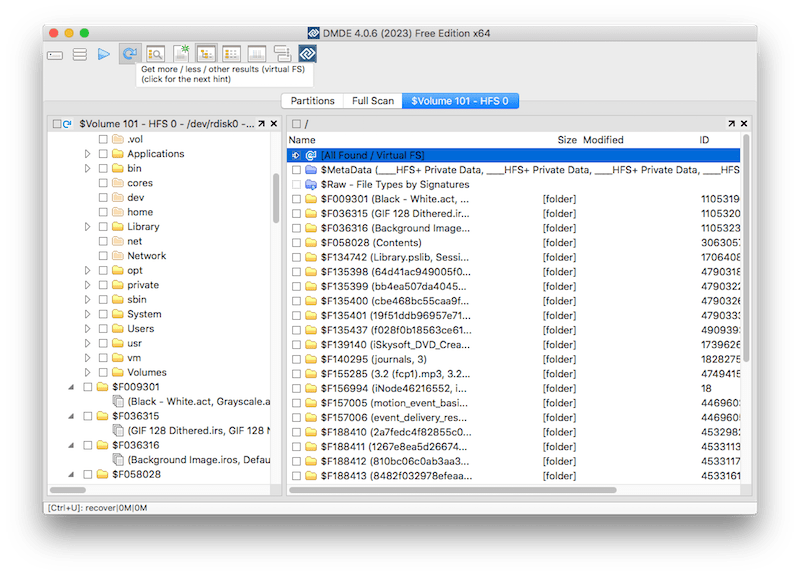
DMDE, short for DM Disk Editor and Data Recovery Software, has a free edition armed with useful features including file recovery, disk editor, simple partition manager, RAID constructor and disk imaging. The free version is only accessible to personal users. Data recovery is limited to 4000 files at one time, but there’s no limit on how many files to recover if they’re divided into batches of 4000.
Platforms: macOS 10.12+
Pros:
- Free and advanced
- Prompt dialog box in each step
- Low-level disk editing
Cons:
- Found files have been renamed after scanning
- Undefined scan results
- No file filters
Summary
There are hundreds of data recovery software for Mac users, but just a few of them deliver a satisfying result. If you are looking for a straightforward tool with high recovery rate, Cisdem and Disk Drill are the best. If you are looking for a best free Mac data recovery program, the choice is very limited, but open source like PhotoRec and DMDE is worth a try.
If you can't recover data from your Mac or other drives with a data recovery tool, then you can consider getting it back by an in-lab service. The service is often at high price, but it worth a try when data recovery software fails. There are many professional data recovery service providers like Secure, Seagate, Kroll Ontrack, Data Rescue, etc.
Last but not least, backup your important files regularly. There are many ways to backup your files. You can backup them to Time Machine drive or external drive. Cloud storage services like Dropbox, Google Drive and Microsoft OneDrive can also be used to backup important data online. Thus, you can always get lost files back without the help of data recovery software or services.

Connie Yu has been a columnist in the field of data recovery since 2011. She studied a lot of data loss situations and tested repeatedly to find a feasible solution tailored for each case. And her solutions are always updated to fix problems from the newest systems, devices and apps.

JK Tam is the lead developer at Cisdem, bringing over two decades of hands-on experience in cross-platform software development to the editorial team. He is now the lead technical approver for all articles related to Data Recovery and DVD Burner.
Jenny
To be honest, though free data recovery tools are free, they do have many limitations. Like their operations are too complicated for beginners, low recovery rate, slow scanning speed... In such a case, obviously, paid programs have their own advantages. This post talks across the board.
Bennett
I have ever used Easeus (almost $90). It seems that your Cisdem recovery tool is much cheaper.
Megan Charles
Yes. The price of Cisdem DataRecovery for Mac is the most competitive in the market.
L.Hughes
Is the Cisdem program workable to Windows 7?
Megan Charles
Hi, L.Hughes. I'm afraid not. It is especially-designed for Macs.
michaelyoussef
i need this program
michael
i need it
Perry
Comprehensive article. I will try Cisdem DataRecovery and I will read other articles. Keep on.
Danny Heppner
I deleted my data by accident and I ask help for Google, and I found this article from it. I read it and tried Cisdem DataRecovery for Mac. It is powerful!!! Now my data is recovered. Thank you!!!
Albert
Final Verdict is useful, it means that writer had tested 3 data recovery software. Maybe Cisdem DataRecovery is a good choice, I will try.